A Home Office Beside the Window Without the Screen Glare
The window is often the reason a home office corner feels inviting. It gives the room a view, changes its mood through the day and makes a short pause from the screen more pleasant. Then a bright afternoon arrives and the display becomes a map of everything behind you. Keeping the window in the design is usually worth trying. The useful adjustment may be the direction of the screen, the amount of exposed glass or the position of a lamp, rather than abandoning the corner altogether.
Begin from the chair at the time the problem occurs. Look at a dark area of the display and identify what you can actually see reflected there. A window-shaped patch points toward a different intervention from a small bright spot made by a lamp. Also notice whether the room feels uncomfortable even when the screen has no obvious reflection. A bright opening directly beyond the display can compete for your attention without appearing on its surface. Naming the problem gives you something specific to change.
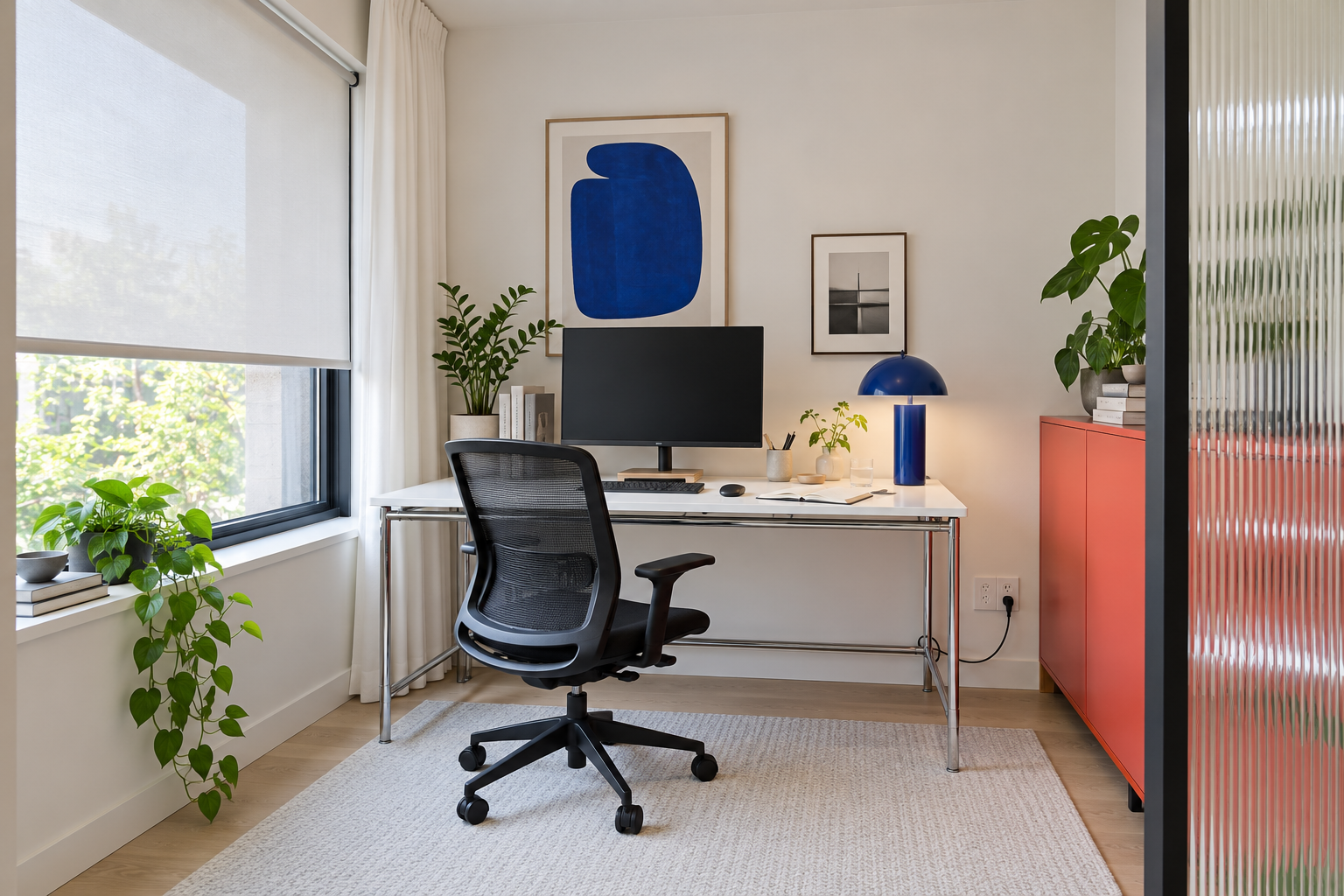
Image credit: pxef.com. AI-generated design concept.
In our room concept, a matte white desk on a slender chrome frame sits against the wall beside the window. The monitor faces into the room, leaving the glazing to the worker’s left rather than directly behind the screen. A translucent roller blind covers most of the window, softening the daylight while leaving part of the lower view open. A cobalt lamp and blue wall print give the working corner a clear identity, while a coral cabinet and ribbed glass panel bring color and light-filtering texture to the right side. The open notebook and black mesh chair keep the composition connected to ordinary work. This is an illustration of a proposed arrangement, not evidence that a particular blind or monitor has been tested.
The brief assumes a 3 by 3.4 metre room, about 9.8 by 11.2 feet, with a 140 by 75 centimetre desk, roughly 55 by 30 inches. Those dimensions describe the proposal; they cannot be established from the generated view. The most important relationship is directional: the face of the screen is roughly at right angles to the window wall. That is a useful starting arrangement to test because it keeps the largest light source out of the positions directly in front of and behind the display. It will still need adjustment in the actual room.
Try turning the workstation before buying something to attach to the screen. A desk that faces the window can put a bright outdoor scene immediately beyond the monitor. Turning around may place the same window behind the chair, where its reflection becomes visible on the display. Moving the window to the side changes that relationship. If the whole desk cannot move, try a small change in monitor position while keeping the keyboard and chair aligned for the task. Avoid solving a reflection by creating an arrangement that makes you twist toward the screen all day.
Window shading earns its place because daylight does not stay where a furniture plan puts it. Choose a control you can adjust from the working area and test it during the troublesome period. A translucent shade may soften a bright sky while preserving some daylight, yet the same fabric may provide too little control when direct sun reaches the desk. The effectiveness depends on the material, the window and the conditions outside. Ask for a sample or examine the shade in comparable light when that is possible. Its appearance in a soft morning photograph tells you little about a difficult afternoon.
There is no need to cover more glass than the problem requires. Depending on the opening and the available fitting, adjustable slats, separate blinds for separate windows or a different lowering position may offer useful control. In the illustrated concept, the lower strip remains uncovered to retain some view. In a real room, that strip might admit precisely the light you need to stop, so copy the idea of adjustment rather than the exact blind position. Check that handles remain usable and that the fabric will not catch on the equipment when the window is opened.
A simple observation log can save a surprising amount of guesswork. For a few working days, note the time, the position of the blind and the part of the desk receiving direct light. Record the weather too. A problem that appears only during a short sunny period may need a targeted shading adjustment; one that persists under bright overcast skies may require more consistent control. Seasonal conditions can change the result again, so retain some flexibility. Cardinal direction alone is an incomplete shopping guide because nearby buildings, trees, balconies and the window’s own shape all affect the light reaching the room.
Check artificial light separately after dark. Turn the task lamp on and off while watching the screen from your normal seated position. If its bright shape appears in the display, move or aim it differently and try again. The notebook and keyboard may need local light even when the monitor seems bright enough. You can test that relationship with an existing lamp before choosing a permanent one. The cobalt lamp in this concept occupies the right side of the desk, but that location is an illustration, not a rule for every person, lamp or task.
The desk surface belongs in the experiment as well. A glossy top can add reflections to the area around the screen, while a quieter finish may be easier to live with. Lay a matte sheet or an existing desk mat over a troublesome reflective area to see whether the change helps before replacing furniture. Keep the working surface practical for the activity you do there. A material that photographs beautifully but shows every light source and fingerprints immediately may become a distraction, especially when it occupies much of your field of view.
Make the display readable through its own controls and software settings once the light sources are reasonably managed. Check brightness, contrast and text size with the applications you actually use. Increasing brightness alone may leave the reflected window exactly where it was. A small monitor tilt can change a reflection, but observe whether it introduces another one or makes the viewing position less comfortable. Screen filters and films are product-specific decisions; check compatibility and their effect on the display before treating them as the inevitable final purchase.
Video calls deserve a separate trial because the camera sees the room differently. Open the application you use and check your face, the window and the background together. A blind setting that makes the screen comfortable may still leave the camera working with an awkwardly bright background. Keep a repeatable setting for calls if it helps, then restore the room afterward. There is no obligation to arrange an entire working day around a few minutes of webcam framing.
When the window relationship forces a larger rethink, compare it with the other constraints in the room. Our guide to desk placement in a small office considers the door, chair and storage alongside daylight. The aim here is to keep the qualities that made the corner appealing while giving you usable control over the light. A blind you can reach, a screen that faces the right way and a lamp you have actually tried can make a more convincing office than a room that looks perfect only at the hour it was photographed.