Home Office Design Starts With the Working Day
The desk usually gets chosen too early. Someone finds a handsome worktop, a neat pair of drawers or a photograph of a room where nobody seems to own a charger, and the office begins to form around that purchase. Then the actual work arrives. There are documents to compare, a laptop that needs connecting, a printer with nowhere sensible to sit and a chair that catches the cupboard whenever it moves. A home office becomes easier to design when the first thing you describe is the working day.
Write down what you do from the moment you begin until the moment you stop. Be specific enough to expose the awkward bits. Reading email on a laptop is different from comparing a drawing with a spreadsheet. Three calls spread through the day create a different room problem from one quiet writing session after dinner. If you regularly spread papers across the dining table despite having a desk, that is useful evidence. Your current arrangement is telling you which activity the office has failed to accommodate.
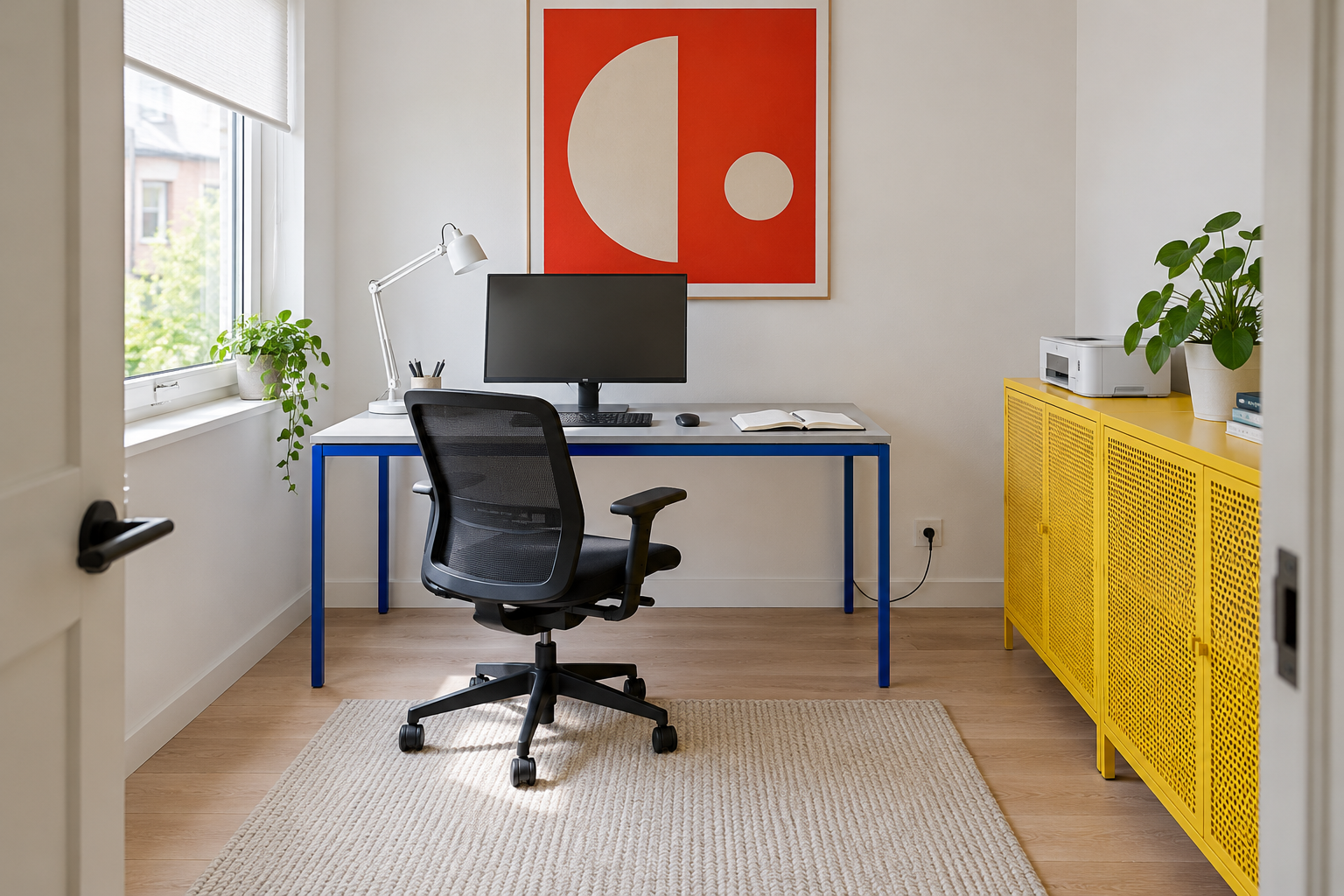
Image credit: pxef.com. AI-generated design concept.
The room concept shown here uses color and light construction to give an ordinary spare-room office some energy. A pale worktop rests on a cobalt blue steel frame, with a monitor in the middle and an open notebook to the right. Daylight enters from the left through a partly shaded window. The black mesh chair has room to move back, while a bright yellow perforated-metal cabinet carries the printer and keeps storage away from the main surface. A large vermilion geometric print makes the white wall feel intentional. Pale flooring and a simple rug balance the stronger colors. There is also a visible cable at the socket: equipment needs power, and a useful design gives it a credible route.
For this proposal, our starting assumptions are a room measuring 3.2 by 3.6 metres, about 10.5 by 11.8 feet, and a desk measuring 140 by 75 centimetres, roughly 55 by 30 inches. Those are design inputs, not dimensions established by the generated image or universal recommendations. The room is intended for one person who uses a monitor, writes short notes and prints occasionally. Someone handling large drawings or working across several displays would need a different surface, arrangement or both. The same attractive furniture could become the wrong equipment for a different job.
Begin your own inventory with what must be available at the same time. A laptop that stays closed while connected to a monitor needs somewhere to live, yet it does not necessarily need prime desktop space. A reference book that remains open for hours does. The keyboard, mouse, writing area and screen must coexist during work, so measure their combined footprint rather than checking each item separately against a desk listing. Include the monitor’s stand and the plugs projecting from the equipment. A surface can look generous in a product photograph and become surprisingly shallow once everything is connected.
The chair also needs a place in the plan. Marking a rectangle for the desk and stopping there leaves out the space occupied by the person using it. Sit down, move back, stand up and turn toward the storage you expect to use. Try the same movements with a door open and a drawer extended. Allowances depend on the chair, the room and the person; an actual movement test is more useful than borrowing one clearance number from an unrelated layout. If another household member needs to pass behind you, test that occupied condition too. A route that exists only when the chair is tucked away is not a route during the working day.
Next, separate the things you touch repeatedly from the things you merely own. Current papers, headphones and a charging cable need convenient access. Old project folders can live farther away. Giving everything equal priority produces a crowded desk and expensive storage in the wrong places. In the illustrated room, the cabinet deliberately takes equipment off the main surface. Its top is a secondary landing area, while its closed doors soften the view from the entrance. Whether a particular printer belongs there still depends on its dimensions, ventilation instructions, paper handling and access for maintenance. A cabinet that hides a device but prevents you opening it has solved the picture and complicated the work.
Light deserves an early trial because the room changes through the day. Put a temporary screen where the monitor would stand and sit at the proposed position when you normally work. A lovely morning corner may receive direct sun later. A desk lamp can serve paperwork in the evening, but its position needs checking from the chair so that it does not appear as a bright reflection on the display. Keep controls accessible. The best blind in the world is a nuisance if reaching it requires climbing around the desk. Our guide to working beside a window looks more closely at that adjustment.
Calls add another view of the room, and it is worth distinguishing the two. The view you enjoy from the chair may have little to do with the view your webcam transmits. Open the actual camera application, use the framing you normally use and check what appears behind you. A doorway, a family noticeboard or a reflective wardrobe can matter more than the carefully arranged shelf. If confidential calls are frequent, the ability to close a door and choose a quiet time may be more valuable than a photogenic background. The picture cannot establish how a room sounds, and decorative softness should not be treated as proof of privacy.
In a shared room, describe what happens outside working hours as carefully as what happens during them. A bedroom office needs a reasonable way to end the day. A dining-table setup needs equipment storage close enough that putting it away is a small task. A guest room needs an honest plan for the days when the bed is occupied. Decide which activities can happen together and which require a changeover. A room does not become more flexible simply because several functions have been named in its description. Someone has to move the chair, clear the table or fold the equipment away.
Make shutdown part of the design. Choose a place for the unfinished document, a place for the headset and a way to leave charging equipment connected without spreading it across a walking route. This need not mean elaborate joinery. A tray, a drawer and a reachable socket may be enough. What matters is that the routine can happen on a tired evening. A setup that depends on ten minutes of meticulous cable coiling will probably remain on the table, and the room will carry yesterday’s work into tomorrow morning.
Once those decisions are reasonably clear, style becomes more enjoyable because it has something solid to work with. You can choose a warmer timber, a painted cabinet or a quieter wall color without expecting decoration to compensate for an awkward layout. In this concept, cobalt steel, yellow storage and the red print offer a deliberate contemporary palette. There is no need to reproduce them literally. An existing desk in good condition may deserve a better position before it deserves a replacement. If placement is the unresolved problem, start with where the desk can go in a small office.
Before buying anything substantial, use the closest available table and chair to rehearse a normal work session. Gather the equipment, lay out the papers and keep track of what interrupts you. Perhaps you need more depth, perhaps less furniture, perhaps a cabinet on the other side of the room. Adjust one thing and try again. Your aim is a home office where ordinary work has a place to happen, and where finishing work lets the home feel like home again.