How Much Desk Space Does Your Work Actually Need
Desk listings give two numbers, width and depth, and invite you to compare them with a gap in the room. That tells you whether the desk fits the room. It says very little about whether your work fits the desk. The useful measurement is the area your equipment and papers need at the same time, laid out the way you actually use them, plus the space behind the desk that cables and stands quietly take for themselves.
There is no single right desk size, because a person answering email on a laptop and a person checking printed drawings against a spreadsheet are doing different jobs. What helps is working through a few typical kits with honest dimensions and seeing which numbers drive the answer. The figures below are examples and assumptions, not specifications. Your own monitor stand, keyboard and documents are what count.
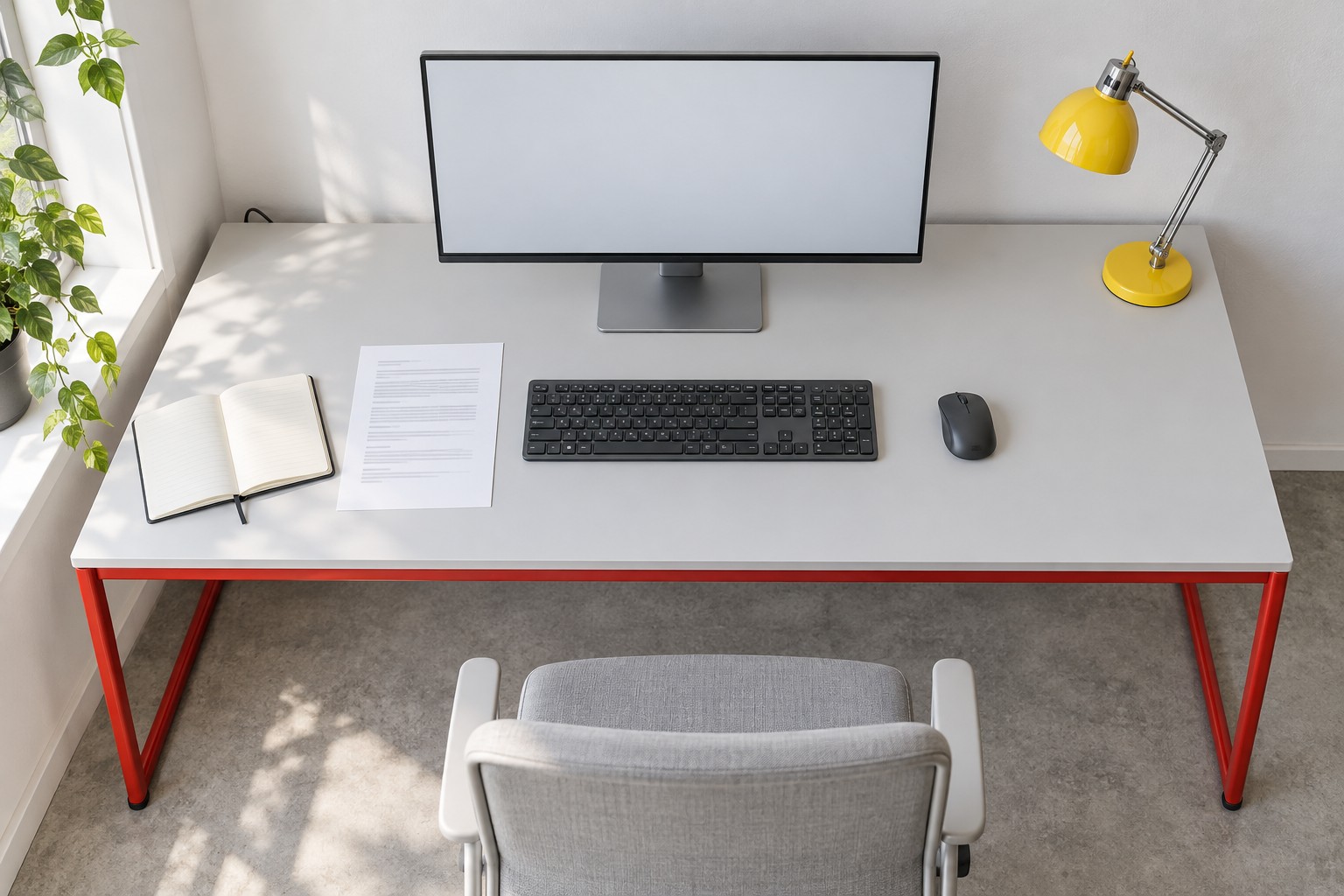
Image credit: pxef.com. AI-generated design concept.
The image makes the working surface legible from above: a monitor and its stand occupy the back, the keyboard sits in front, and a reference sheet and open notebook share the left side. The mouse has its own space on the right, with a yellow lamp behind it; the red steel frame remains visible below the pale top. The concept here is a single desk of 140 by 75 centimetres, about 55 by 30 inches, with a matte pale top on a red tubular steel frame. On it: one monitor on its own stand at the back, a full-size keyboard centred in front of it, a mouse to the right, a notebook and an open reference document to the left, and a small yellow lamp in a back corner. The point of showing it from above is to make the occupied surface readable. It is a proposal for one kind of work, the middle of the three described here, not a universal recommendation.
Depth is usually the tighter dimension, so start there. Work from the wall forward. Cables and plugs at the back of a monitor typically want a few centimetres behind the stand; call it 5. A monitor stand might have a base around 20 to 25 centimetres deep, depending on the model. In front of that you want some open surface before the keyboard, partly for viewing distance and partly so the keyboard is not jammed against the stand. A full-size keyboard is around 13 to 15 centimetres deep. Then you need somewhere for your forearms or wrists, or simply a little margin before the edge, perhaps 10 to 15 centimetres. Add those up with a modest 10 centimetre gap and you have roughly 60 to 70 centimetres. A 75 centimetre top leaves space to push the screen back if you prefer it farther away, or to slide a notebook between keyboard and stand. A 60 centimetre top is workable for many single-screen setups but leaves very little slack.
Width depends on what sits side by side. Take three working kits.
The first is a laptop kit: a laptop on a stand behind a compact keyboard, a mouse, and a small notebook. Assume a 14 inch laptop about 32 centimetres wide on a stand with a similar footprint, a compact keyboard around 36 centimetres wide, a mouse area about 20 centimetres wide and an A5 notebook, 15 by 21 centimetres, opened to about 30 centimetres. The front row is the critical one: notebook 30, keyboard 36, mouse 20 and a few centimetres between each comes to about 95 centimetres. The laptop sits behind the keyboard and adds depth, not width. A desk around 100 by 60 centimetres is a plausible starting point to test for this kit, and a phone or charger fits in a back corner.
The second is one monitor plus paper, the kit in the illustrated concept. Assume a 27 inch widescreen monitor about 61 centimetres wide, a full-size keyboard about 44 centimetres wide, a mouse area of 20, and an A4 sheet, 21 by 29.7 centimetres, lying portrait beside the keyboard as reference. The front row is A4 21, keyboard 44 and mouse 20, plus three gaps of around 5, which makes about 100 centimetres. The monitor sits above the keyboard and fits inside that width. Add the open A5 notebook from the first kit beside the A4 sheet and you reach about 130 centimetres. That is why 140 feels comfortable for this kit, with room for a lamp base in a back corner, while a 120 centimetre desk requires a different arrangement or a place for one document away from that front row.
The third is a larger document workflow: someone comparing a printed drawing, a contract or two open documents with what is on screen. An A3 sheet is 42 by 29.7 centimetres; an open binder of A4 pages is about the same. Lay one beside the keyboard and the front row becomes A3 42, keyboard 44, mouse 20 and gaps, or roughly 115 centimetres before anything else. Two documents side by side push it past 140. At this point there is a real choice. You can go wider, perhaps 160 centimetres if the room allows, or you can go deeper and place the document in front of the keyboard while you read it, pushing the keyboard back. A deeper surface may make that shuffle easier, depending on the equipment and the way you work. Some people use a separate small table or a wall-mounted ledge for reference sheets instead of a bigger desk, which keeps the main surface sane.
Input devices need their moving space, not just their footprint. A mouse travels; the 20 centimetres above is an allowance for that, and someone who works with low pointer sensitivity may need more. A drawing tablet or a trackpad beside the keyboard adds its own width. If you switch between keyboard and handwriting, the notebook needs to sit where your hand can reach it without the keyboard moving every time. Watch your own hands for half an hour. The pattern of where they go is more reliable than any listing.
The monitor stand deserves particular suspicion. Two screens with the same diagonal can come on stands with very different base depths, and some bases spread wide as well. A stand that takes 25 centimetres of a 60 centimetre desk leaves little in front. A monitor arm can free that space, but it brings its own questions about desk construction, clamp space and the weight it is rated for. That is a decision to make with the actual specifications in front of you rather than as a quick fix.
Then there is the space behind and beneath. A desk pushed tight against a wall loses depth to every plug that sticks out of the back of the monitor and every power brick that hangs behind. A skirting board or a radiator can stop a desk short of the wall by a few centimetres, which is effectively depth you have paid for and cannot use. Underneath, a drawer unit or a crossbar reduces knee and leg room. Measure the usable top, not only the nominal one.
Height matters too, though it is a separate topic from area. A fixed desk comes at one height, which an adjustable chair can accommodate for many people but not for everyone. Nothing in this calculation replaces trying the actual height with your actual chair.
The quickest test starts with your equipment rather than a furniture catalogue. Clear a table that is larger than the desk you are considering. Lay out everything you use at the same time during a normal hour: screen, keyboard, mouse, papers, notebook, phone, cup. Arrange them the way you would work, then put a piece of string or masking tape around the outer edge of the occupied area, adding a little at the back for cables. Measure that outline. It is the desk your work needs.
If the number is bigger than the room allows, decide what can move rather than squeezing everything. The laptop can live on a shelf when docked. Reference papers can go on a side surface. A printer belongs elsewhere entirely, as our printer article explains. Where the desk goes once you know its size is a separate question, covered in desk placement for small offices. Get the surface right first. A desk that fits the work is easier to place than one that only fits the gap.